
Billing & Usage
Plans, run quotas, overages, and managing your subscription.
Billing and usage are scoped per project. Each project has its own plan, its own run quota, and its own subscription. Only admins can change the plan or manage the subscription; everyone on the project shares the same quota.
Run quota
Your quota is the pool of test runs a project can use in a monthly period, where one run is one test-case execution. It's the number tracked against your plan, and it's what blocks launches when it runs out.
Runs are counted the moment a launch or preview starts:
- A launch consumes one run per test case in the suite. Launching a suite of 8 test cases costs 8 runs.
- A preview (watching a single test case run live) consumes 1 run.
Launches draw from the same pool no matter how they start, whether from the dashboard, on a schedule, or through CLI/CI. Quota resets at the start of each period: on the Free plan the period follows the project's creation date each month; on a paid plan it follows the Stripe billing cycle.
Where to see it
The project sidebar shows a live quota indicator to every project member. Hover it to see the exact reset date.
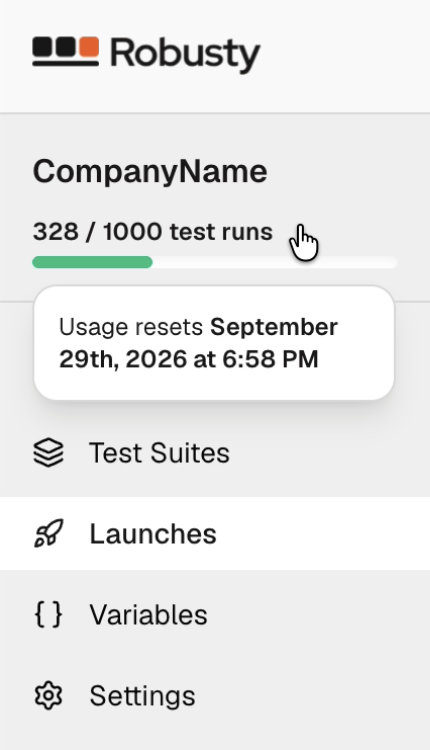
Admins get the full breakdown in Project → Settings → Usage: included runs used, runs remaining, the current period's start and end dates, and the reset countdown.
Plans
Every project starts on the Free plan. Paid plans raise the number of test runs included each month and are billed monthly in USD (taxes are calculated at checkout).
| Plan | Price | Included test runs / month | Included users |
|---|---|---|---|
| Free | $0 | 20 | 1 |
| Starter | $29 / mo | 300 | 2 |
| Team | $99 / mo | 1,000 | Unlimited |
| Enterprise | Custom | Custom | Unlimited |
Starter includes email support; Team adds priority support and billing for overage past its included runs (see below). Enterprise is a custom plan — contact the Robusty team to arrange pricing and terms; it isn't a self-serve upgrade in the dashboard.
When you reach the limit
What happens once a project uses all of its included runs depends on the plan.
Free and Starter have no overage. Further launches and previews are blocked
until the quota resets or an admin upgrades the plan. Attempting to start a run over
the limit fails with a quota_exceeded error rather than silently charging you.
Team supports overage: runs keep working past the included 1,000, and each
extra run is billed at $0.12. Once the included runs are used up, the sidebar
quota indicator switches to Pay-as-you-go · $0.12 / run and shows how many extra
runs the project has used this period. The overage total is added to the project's
next Stripe invoice.
On Free and Starter this applies to CI as well. A robusty launch
that can't fit inside the remaining quota is rejected and the CLI exits non-zero,
which will fail the pipeline. Upgrade the plan or wait for the reset before
re-running.
Managing the subscription
All subscription actions live in Project → Settings → Billing and are handled through Stripe. This section is admin-only.
Upgrade from Free. The Billing card shows the Starter and Team plans. Choose one and select Upgrade to open Stripe Checkout. When payment completes, the project switches to the new plan and its higher quota takes effect immediately.
Change plan, payment, or invoices. On a paid plan, Manage billing opens the Stripe customer portal, where you can switch between paid plans, update the payment method, download invoices, and schedule cancellation.
Cancellation. A canceled subscription stays active until the end of the current
period — the Billing card shows a Cancels on <date> note, and the project keeps
its paid quota until then. After the period ends, the project reverts to the Free
plan and its 20-run monthly quota.
Past-due payments. If a renewal payment fails, the Billing card shows a Payment failed warning and access continues while Stripe retries. Use Update payment method to fix the card. If the subscription is ultimately canceled by Stripe, the project drops back to the Free plan.
How is this guide?