

Test AI features with dynamic content
Test LLM features like chatbots, AI assistants, and generated content in a real browser, even when non-deterministic outputs change from run to run.
Updated:
Outcome
Confidence in releasing AI features with dynamic outputs
Test AI outputs without hard-coding expected result
Generative AI rarely produces one fixed result. The same prompt can lead to different wording, structure, layouts, recommendations, or actions, with more than one valid output. Checking for exact text can reject a good result. Checking only that something was generated can miss incorrect or irrelevant output.
Robusty tests whether the output satisfies the intended outcome. Describe what the AI feature should produce or accomplish in plain English, and Robusty uses a real browser to complete the workflow, inspect the result, and verify what a user can do with it.
Try an AI chatbot testing scenario yourself
The Robusty demo is a ChatGPT-style application. Users can sign in, start a chat, ask questions, and continue the conversation with follow-up prompts.
Write the test like you would explain it to a teammate
You do not need to write code, describe every click, or hard-code the generated output. This is the exact test description you can use in Robusty:
Login with email {{TEST_USER_EMAIL}} and password {{TEST_USER_PASSWORD}}.
Ask a question "What is machine learning?" and make sure the chat provides a correct answer.
After that, ask a clarifying question "What's the difference between supervised and unsupervised learning?" and also verify the reply.
To run it yourself, sign up on the demo, create a Robusty project with https://demo.robusty.io as its URL, and save your demo email and password as the TEST_USER_EMAIL and TEST_USER_PASSWORD variables.
Robusty follows those instructions in the browser just as a person would. For this particular scenario, it verifies that the user can log in, send both prompts, receive relevant output, and continue the same conversation without requiring identical wording on every run.
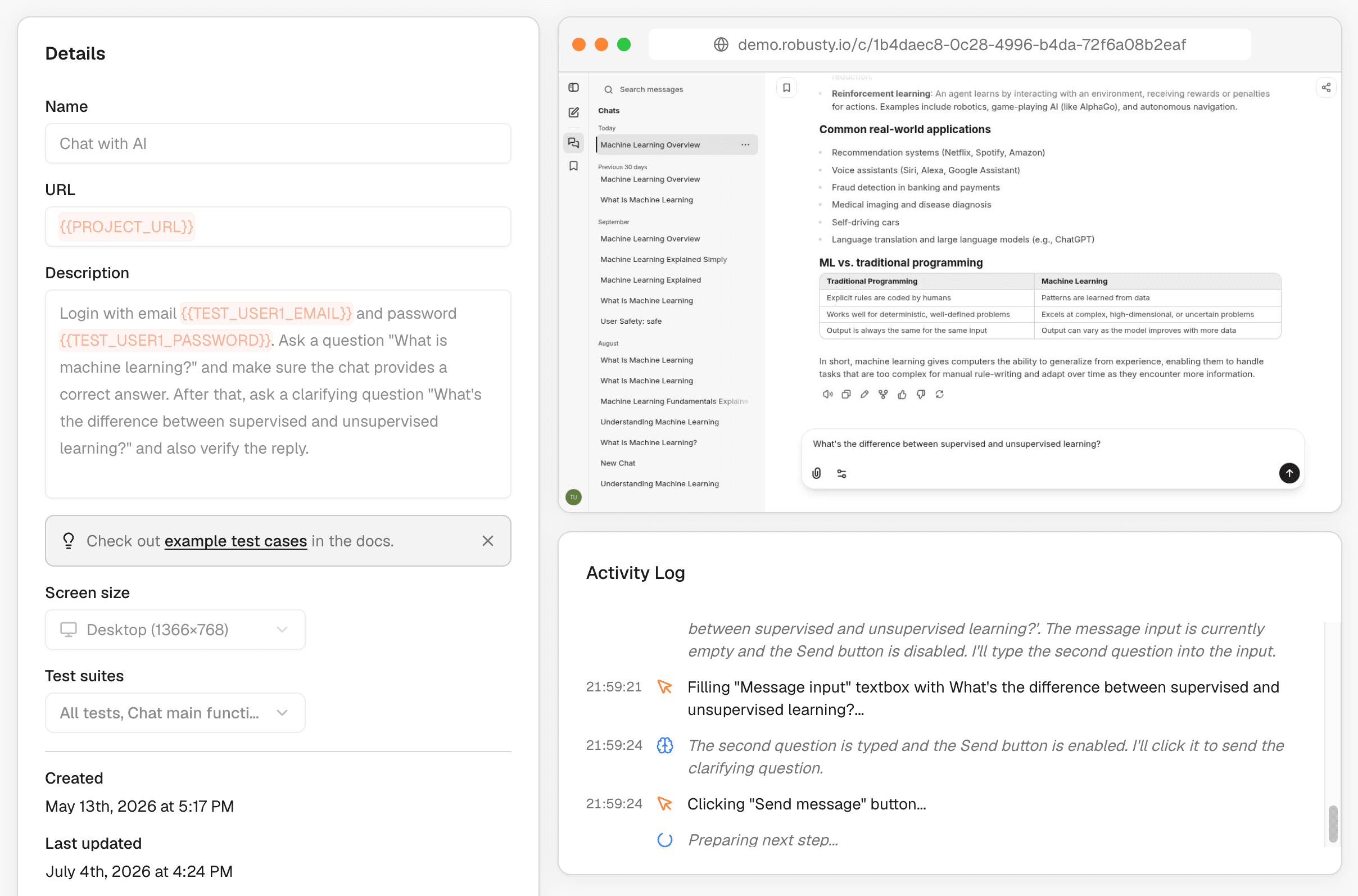
How Robusty judges a dynamic answer
There is no stored answer to compare against. Robusty reads the reply on the page and evaluates it against the criteria in your description, the way a human reviewer would. For a general-knowledge question like this one, it can judge whether the explanation is accurate and on topic. For answers that depend on your own data, such as prices, policies, or account details, state what the reply must include, for example "confirm the reply names at least one vegan dish". Specific criteria leave less room for interpretation, so the verdict stays consistent from run to run.
Every verdict comes with the reasoning behind it and screenshots of each step, so you can check why a reply passed or failed. See how to write a test description for more guidance.
A generated website, document, or workflow can be tested in the same way: describe what a successful result should contain and how it should behave.
What AI-generated outputs can you test?
Here are just a few examples of AI-generated outputs and experiences you can test:
- Chatbot replies, AI assistants, and customer support conversations.
- Generated websites and interfaces with required content, sections, links, and user flows.
- AI search results, summaries, recommendations, plans, and reports.
- Structured outputs that must include specific facts, fields, or formatting.
- Multi-step agents that use tools or complete a task on the user's behalf.
Test the outcome users actually experience
An AI feature is more than the model behind it. Prompts, connected data, tools, user input, and the interface all shape what your customers experience. Robusty tests how those pieces work together through the same UI your customers use.
Turn your important user journeys into tests, group them into a regression suite, and run them manually, on a schedule, or integrate them into your CI/CD pipeline. Because each scenario describes user intent rather than one exact response, DOM structure, or generated layout, the tests remain reliable even when the product evolves.
When a scenario fails, the recorded browser session shows the inputs, interactions and browser screens. Your team can inspect whether the problem came from the UI, the AI integration or the model's output.