

Test checkout and payment flows
Test the full purchase journey end to end in a real browser, from sign-up and plan selection through Stripe checkout to the upgraded customer account.
Updated:
Outcome
Confidence that customers can pay and get what they paid for
Test checkout end to end, including the payment provider
Checkout depends on several systems working together. Your pricing page, the payment provider, the redirect back to your app, and the customer’s updated account all need to stay in sync. Scripted browser tests often mock or skip the third-party step because it lives on another domain or inside an iframe, so the part most likely to cost you revenue goes untested.
Robusty runs the whole purchase in a real browser. Describe what the customer buys and what a successful result looks like in plain English, and Robusty fills in the payment form, follows the redirects, and checks that your product reflects what was paid for.
Try a subscription checkout scenario yourself
The Robusty demo is a ChatGPT-style application with a paid Pro plan. Users can create an account, upgrade from the account settings, and pay on a Stripe checkout page running in test mode.
Write the test like you would explain it to a teammate
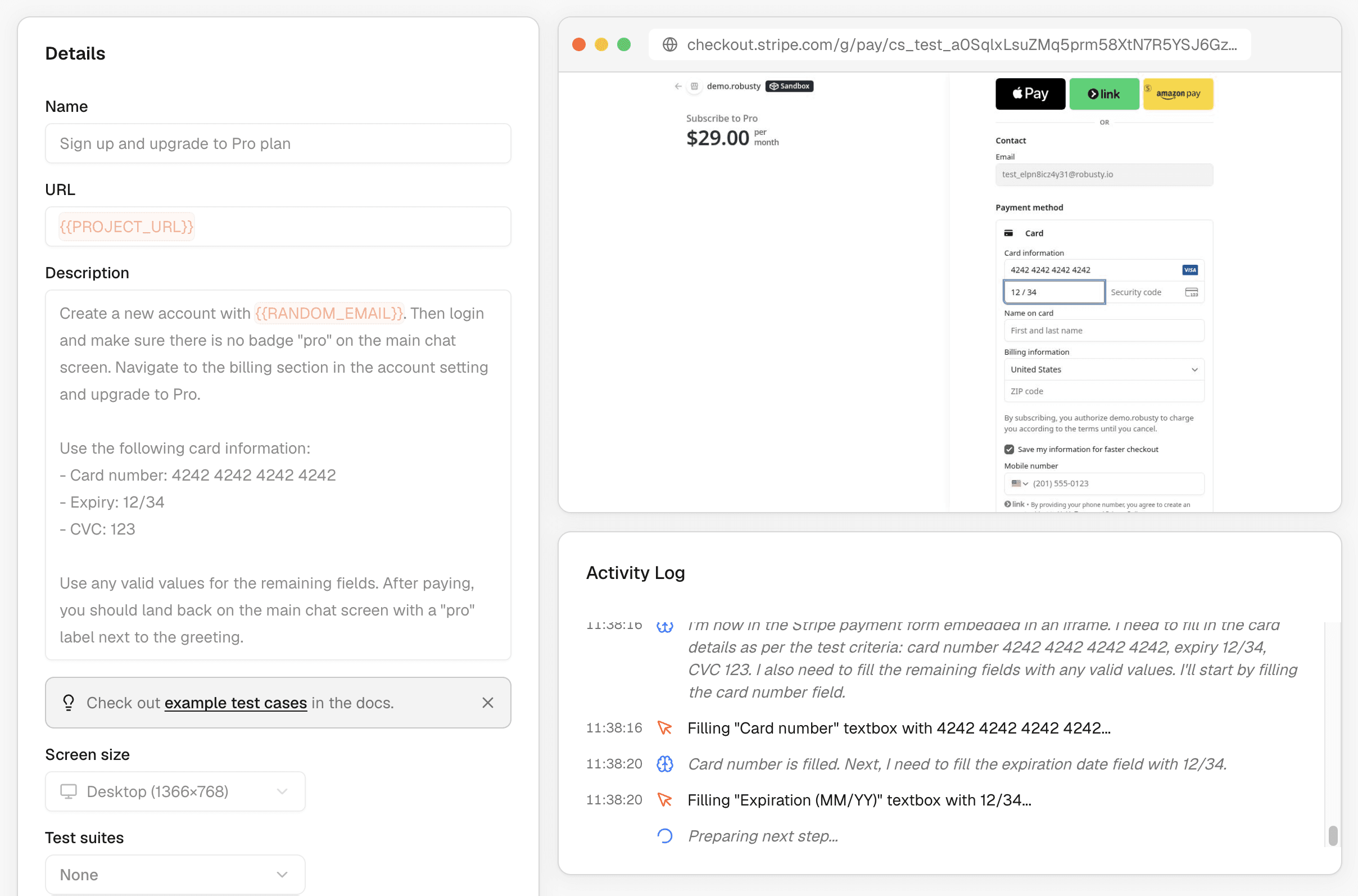
You do not need to write code, describe every click, or mock the payment provider. This is the exact test description you can use in Robusty:
Create a new account with {{RANDOM_EMAIL}}. Then login and make sure there is no badge "pro" on the main chat screen. Navigate to the billing section in the account setting and upgrade to Pro.
Use the following card information:
- Card number: 4242 4242 4242 4242
- Expiry: 12/34
- CVC: 123
Use any valid values for the remaining fields. After paying, you should land back on the main chat screen with a "pro" label next to the greeting.
To run it yourself, create a Robusty project with https://demo.robusty.io as its URL. You don't need a demo account or any variables: the test signs up for a new account on every run.
Robusty follows those instructions in the browser just as a person would. For this particular scenario, it verifies that a new user starts on the free plan, can reach billing, complete the payment on Stripe's page, return to the app, and see Pro applied to their account. Every run signs up with a fresh address from the built-in RANDOM_EMAIL variable, so the test always starts from a clean free account, and the Stripe test card never charges real money.
The same approach works for carts, one-time purchases, and plan changes: describe what the customer buys and what they should see once the payment goes through.
What checkout flows can you test?
Here are just a few examples of checkout and payment flows you can test:
- Subscription upgrades, downgrades, and plan changes.
- Adding, removing, and updating products in the cart.
- Valid and invalid promotion codes, taxes, and order totals.
- Hosted payment pages and redirects from providers like Stripe.
- Order confirmations, receipts, and account history after purchase.
Test the outcome customers actually pay for
A successful payment is not the finish line. Customers need to get the plan, order, or feature they paid for. Robusty checks that result through the same UI your customers use, not just the response from the payment provider.
Turn your important purchase journeys into tests, group them into a regression suite, and run them manually, on a schedule, or integrate them into your CI/CD pipeline. Because each scenario describes what the customer does rather than selectors or DOM structure, the tests remain reliable when you redesign the pricing page or the payment provider updates its checkout form.
When a scenario fails, the recorded browser session shows the inputs, interactions and browser screens. Your team can inspect whether the problem came from your pricing page, the payment provider, or the redirect back to your app.